macOS Setup Guide
Step-by-step instructions for installing AgentOne on macOS, including solutions for common installation issues
Install AgentOne on macOS
Download the desktop app
Head to: https://www.agent-one.dev/download
You'll be redirected to a download page, which will attempt to automatically detect your operating system. Make sure the macOS tab at the top of the page is selected:
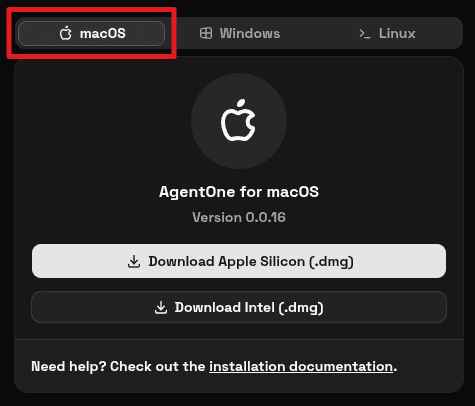
You'll see two download options:
- Download Apple Silicon (.dmg): for Macs with Apple Silicon chips (M1, M2, M3, M4, or newer).
- Download Intel (.dmg): for older Macs with Intel processors.
Click the button that matches your Mac.
Not sure which one to pick?
Click the Apple menu in the top-left corner of your screen and select About This Mac. Look at the Chip or Processor field:
- If it says something like
Apple M1,Apple M2,Apple M3,Apple M4, or newer, choose Apple Silicon. - If it says something like
Intel Core i5orIntel Core i7, choose Intel.
If you pick the wrong one, AgentOne may not open correctly or may run more slowly than it should. To learn more, read Apple's support article.
Open the dmg file
When the download finishes, open the .dmg file from your browser or from the Downloads folder in Finder.
Move AgentOne to Applications
In the installer window, drag AgentOne.app into the Applications folder.
Open AgentOne
Open the Applications folder and double-click AgentOne.
The first time you launch the app, macOS may ask you to confirm that you want to open something downloaded from the internet. Click Open to continue.
Troubleshooting
"AgentOne.app" is damaged and can't be opened
This is a common macOS Gatekeeper message for apps downloaded outside the App Store. To fix this, first try to go to System Settings > Privacy & Security and click 'Open Anyway' next to the security warning. If that doesn't work or you don't see a warning, try these steps.
- Delete the old
.dmgfile and deleteAgentOne.appfrom yourApplicationsfolder if it is already there. - Download a fresh copy for the correct macOS version.
- Open the new
.dmgfile. - Drag
AgentOne.appinto theApplicationsfolder. - Open the
Applicationsfolder, but do not open AgentOne yet. - Open the
Terminalapp on your Mac. You can do this by pressingCommand+Space, typingTerminal, and pressingReturn. - Copy and paste this command into Terminal:
xattr -cr /Applications/AgentOne.app- Press
Returnon your keyboard to run the command. - Close Terminal.
- Go back to
Applicationsand openAgentOneagain.
What this command does: it removes the macOS quarantine flag from the app so macOS will re-check it normally.
Only do this if you downloaded AgentOne from agent-one.dev or the official
GitHub releases page.
If you still see the same message after doing this, join our Discord server for live support.
"AgentOne.app" was downloaded from the internet
This is a normal macOS warning shown the first time you open many apps downloaded outside the App Store. If you downloaded AgentOne from agent-one.dev or the official GitHub releases page, click Open.
"AgentOne.app" cannot be opened because the developer cannot be verified
macOS Gatekeeper may block new or newly updated apps until you explicitly allow them.
To resolve the issue, follow these steps:
- Double-click
AgentOne.apponce so macOS shows the warning. - Open
System Settings. - Go to
Privacy & Security. - Scroll down to the
Securitysection. - Click
Open Anywayfor AgentOne. - Confirm by clicking
Open.
Apple notes that the Open Anyway button is only available for about one hour after you try opening the app.
If none of this works, you could also try the steps in the "AgentOne.app" is damaged and can't be opened section.
"Apple could not verify "AgentOne.app" is free of malware"
This is another version of the same Gatekeeper warning. Follow the steps in "AgentOne.app" cannot be opened because the developer cannot be verified.
The app says it is from an unidentified developer or an unknown developer
This is another version of the same Gatekeeper warning. Follow the steps in "AgentOne.app" cannot be opened because the developer cannot be verified.
Other Problems
Having a different issue? Join our Discord server for live support!