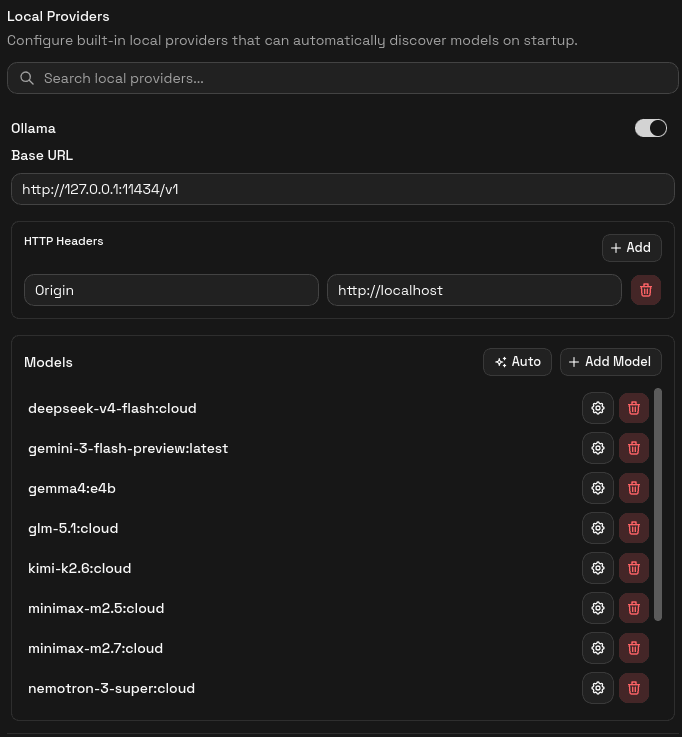
Local Providers
Use Ollama and LM Studio as built-in local providers inside AgentOne.
AgentOne includes two local providers out of the box: Ollama and LM Studio. Both run on your own machine, so no API key or internet connection is needed for inference once the local runtime is running.
They appear in Settings -> Providers under the Local Providers heading - separate from both built-in cloud providers and custom providers.
Default Base URLs
| Provider | Default Base URL |
|---|---|
| Ollama | http://127.0.0.1:11434/v1 |
| LM Studio | http://127.0.0.1:1234/v1 |
These match the defaults used by each runtime when run locally. If you have changed the port on your installation, update the base URL in the provider settings to match.
Quick Start
Install and Start the Runtime
For Ollama, install it and run a model with ollama run <model-name> or start the Ollama service. For LM Studio, install it and start the local server from inside the app.
The runtime must be running before AgentOne can connect to it.
Open Provider Settings
In AgentOne, click Settings -> Providers and locate the provider under Local Providers.
Confirm the Base URL
Check that the base URL shown matches where your runtime is listening. If you are using the default port, no changes are needed.
Let AgentOne Detect Models
AgentOne queries the runtime automatically on startup. If models are found, they appear in the provider's model list and in the model selector in chat. If they do not appear, click Auto in the Models section to trigger detection manually.
Ollama-Specific Notes
The built-in Ollama provider sends an Origin: http://localhost header with every request. This is required because Ollama's default configuration rejects requests that do not include a recognized origin. You do not need to add this header yourself.
If you are running Ollama somewhere other than 127.0.0.1 - for example, in a Docker container or on a remote machine - update the base URL accordingly and check whether Ollama's OLLAMA_ORIGINS setting needs to allow the new origin.
For a full Ollama walkthrough, see Local LLMs with Ollama.
LM Studio Notes
LM Studio's local server defaults to port 1234. Make sure the server is started inside LM Studio before opening AgentOne, as the app cannot connect until the server is listening. LM Studio does not require an API key for local connections.
For a full LM Studio walkthrough, see Local LLMs with LM Studio.
Manual Model Entry
If automatic detection fails, you can still add models by hand. Click Add Model inside the provider and enter the model ID exactly as the runtime reports it (for example llama3.2 or mistral). You can retry Auto at any time - it will not create duplicates.
Why Use a Local Provider?
- Privacy: prompts never leave your machine.
- No usage costs: you pay for hardware, not per-token API fees.
- Offline use: once the model is downloaded, no internet connection is needed.
- Experimentation: quickly try new open-source models without account setup.