Built-in Providers
Enable built-in cloud providers, add API keys, and manage model overrides in AgentOne.
AgentOne ships with over 60 cloud providers already configured. You only need to enable the ones you want and supply your API keys - there is no URL to configure or custom JSON to write.
What Counts as a Built-in Provider?
Built-in providers are the cloud AI services that AgentOne has first-class support for. They appear under the Built-in Providers heading in Settings -> Providers. Each one has a known base URL and a set of bundled model definitions, so the only thing you supply is an API key.
Common examples include OpenAI, Anthropic, Google, Groq, and Mistral. The full list is visible in the app by scrolling through the Built-in Providers section.
Enabling a Provider
Open Provider Settings
In the sidebar, click Settings, then choose Providers.
Find the Provider
Scroll through the Built-in Providers list or use the search field to find your provider by name.
Expand and Enable
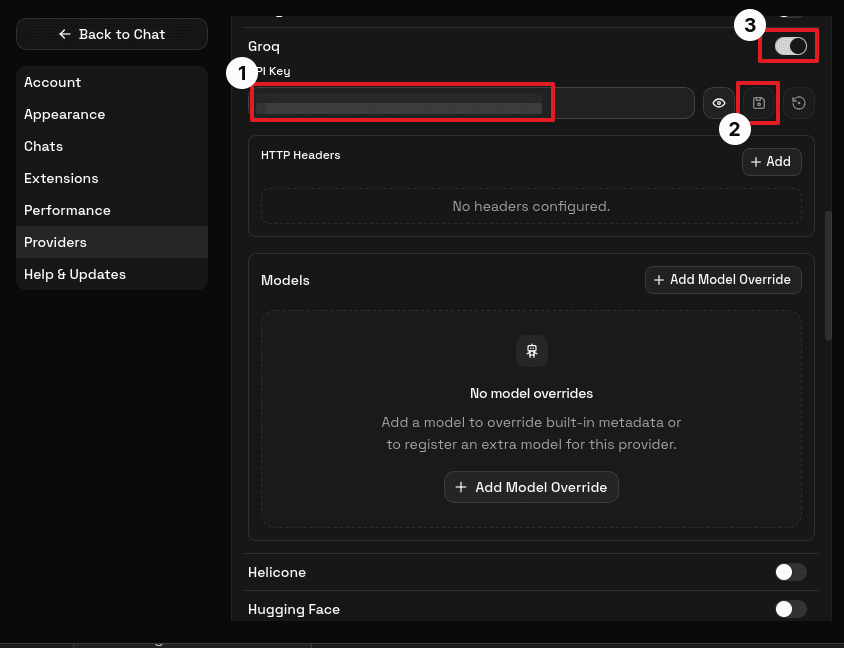
Click the provider to expand it, then toggle the enable switch on.
Enter Your API Key
Paste your API key into the API Key field. The field masks the value with dots once saved.
Click the save button. If you skip saving, the key is not stored and the provider will fail to authenticate.
Once saved, the provider's models immediately appear in the model selector in any open chat.
Environment Variables
Some providers also read an API key from an environment variable. When AgentOne detects a key this way, it shows a hint like Using environment variable. Override below if needed. You can still paste a manual key to override it.
Extra HTTP Headers
Every built-in provider has an HTTP headers editor. This is an advanced feature - most users never need it. It is useful when your organization routes traffic through a proxy that requires a specific header, or when a provider expects a non-standard header alongside the API key.
Model Overrides
Built-in providers come with a curated list of models. You can layer overrides on top of them using Add Model Override. Two reasons to do this:
- Correct metadata: if a model's reported context window or capability flags are wrong in the app, you can override just those fields.
- Register a new model: if the provider has released a model that is not yet in AgentOne's built-in list, add it here with the exact model ID the provider uses.
Overrides do not replace the built-in model list - they supplement it. See Model Metadata for a full explanation of each field.
Per-Provider Guides
For step-by-step API key instructions for specific providers, see: