Search Chats
Search chat titles or message content from the sidebar or search dialog.
AgentOne includes chat search in both the sidebar and the chat search dialog.
Open Search
You can search by:
- clicking the search button in the sidebar
- using
Ctrl+K
If the sidebar is collapsed, Ctrl+K opens the search dialog.
Search Modes
The search controls let you switch between:
- title search
- content search with
Search content
When content search is enabled, AgentOne searches your chat messages instead of only chat titles.
Raw FTS5 Syntax
When Search content is enabled, you can also enable Raw FTS5 syntax.
This is meant for advanced search queries when you want more direct control over the underlying full-text search behavior.
If you do not need advanced operators, leave this off and use normal search phrases.
Search Results
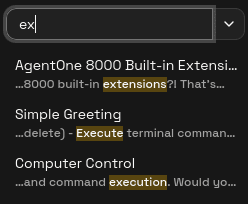
Content search results can show a snippet from the matching message with highlighted text.
If nothing matches, AgentOne shows a No results for ... message.
Tips
- Use title search when you already know roughly what the chat was called
- Use content search when you remember something inside the conversation
- If a raw query is not working the way you expect, turn off
Raw FTS5 syntaxand retry with plain language