AppImage
Step-by-step instructions for running AgentOne as an AppImage on any Linux distribution
Need help? Join our Discord server.
The AppImage is the primary download option on the AgentOne website and works on virtually any Linux distribution without installation.
Download from agent-one.dev
Download the AppImage
Navigate to https://www.agent-one.dev/download in your browser. Make sure the Linux tab is selected, then download the .AppImage file.
Make it executable
Open a terminal and navigate to the directory where the file was downloaded (usually ~/Downloads). Then run:
chmod +x AgentOne_*.AppImageRun AgentOne
Double-click the AppImage file in your file manager, or run it from the terminal:
./AgentOne_*.AppImageDownload from GitHub Releases
If you followed the steps in the Download from agent-one.dev section, you can skip this section.
Select the latest release
Usually, the latest release is the first release on the list. You'll see a green Latest badge next to the latest stable release. If the release has a Pre-release badge or title, don't use it unless you're a developer.
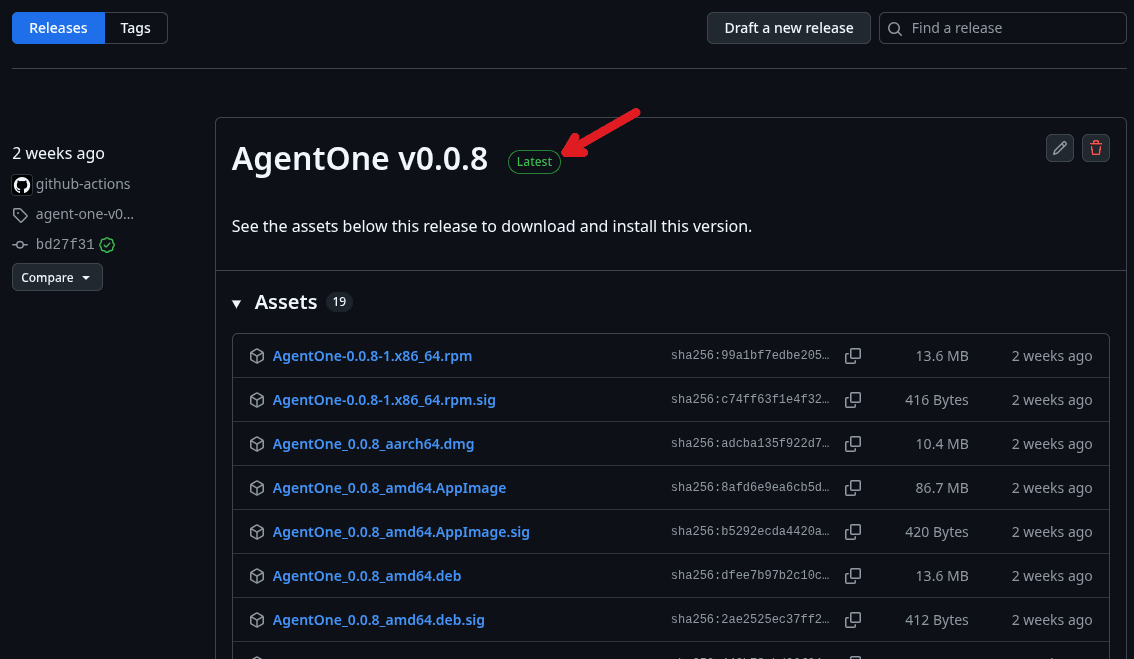
Once you've found the latest release, click on its title (for example, AgentOne 1.0.0) to navigate to that release.
Download the AppImage
Scroll to the bottom of the release page and expand the Assets accordion.
Look for a file named AgentOne_x.x.x_amd64.AppImage and click on it to download it.
Make it executable and run
Open a terminal, navigate to the directory where the file was downloaded, then run:
chmod +x AgentOne_*.AppImage
./AgentOne_*.AppImage