Connect AgentOne to fast-filesystem-mcp
Detailed guide on how to connect AgentOne to the fast-filesystem-mcp MCP server
fast-filesystem-mcp is a performant, feature-rich MCP server that gives AI agents access to filesystems on your device. You can use fast-filesystem-mcp with AgentOne by adding it as a custom extension. Follow the directions below.
Open AgentOne
If you haven't downloaded AgentOne yet, please check the Installation Guide.
Navigate to Custom Extension Settings
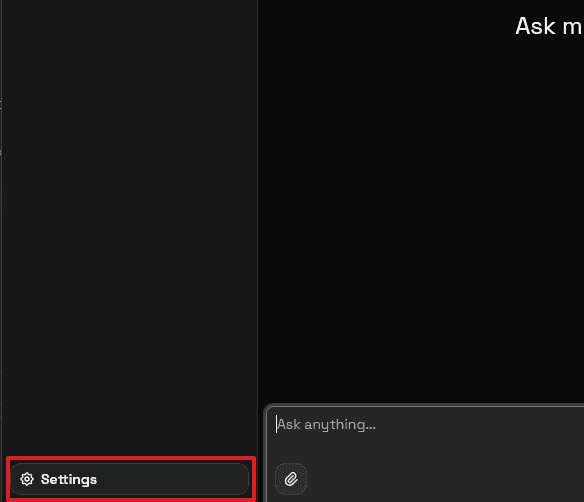
First click Settings in the bottom right of the sidebar. If the sidebar is not expanded, click the "Open Sidebar" button in the top left of the app.
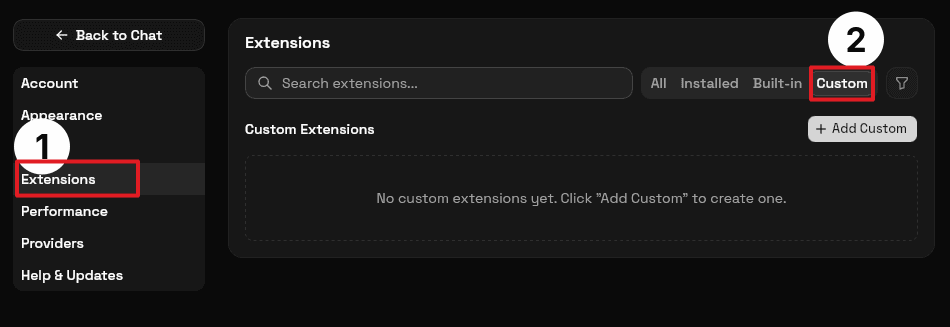
Next, click Extensions in the settings sidebar, then choose the Custom tab. If you don't see the settings sidebar, click the list icon in the top right.
Add the fast-filesystem-mcp MCP Server
Click the Add Custom button, then fill in the details for the fast-filesystem-mcp server.
- Type: STDIO (Local).
- Name:
Fast Filesystem. - Command:
npx -y fast-filesystem-mcp@latest.
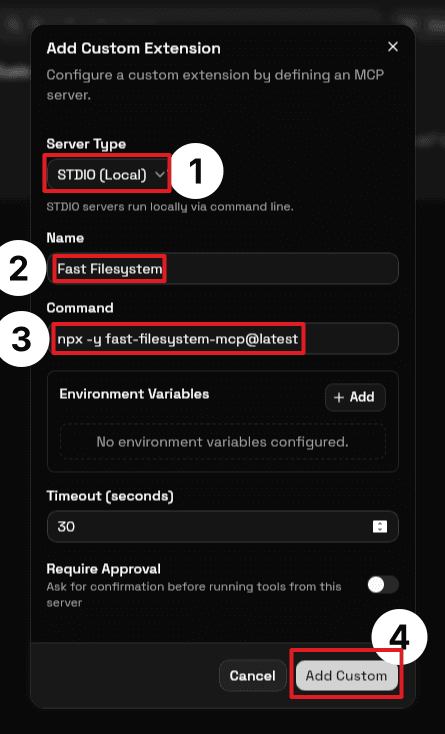
Leave other settings unchanged. Click the Add Custom button at the bottom of the dialog to complete the installation.
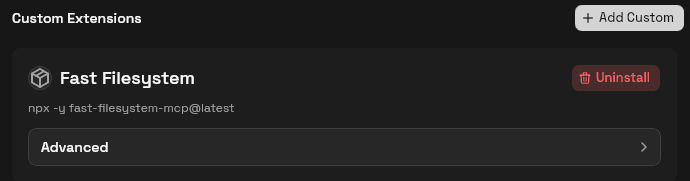
That's it!
You've now added the fast-filesystem-mcp MCP server. Ask AgentOne to find and edit files on your computer.